LoadingPlease wait a moment...
Unlock Insights: Find the Answers You Seek on Our Blog
By Evelyn Sterling
Formatting long text into clean, readable paragraphs sounds simple—until you actually try to do it. Whether you’re cleaning up text copied from the web, organizing messy notes, or preparing a long document, manually creating paragraph breaks can take much longer than expected.
Most people turn to Microsoft Word to fix formatting.It works—but only up to a point.
In this guide, you’ll see how to split text into paragraphs in Word, what problems usually appear, and when an AI text splitter can save you a lot of time.
This is a practical, experience-based comparison to help you choose the right method for the text in front of you.
If you’ve ever pasted text from a website, PDF, or email, you’ve likely seen something like this:
For short text, manually pressing Enter works fine.
But when the text runs for pages, the frustration grows quickly:
These are common issues users face—which is exactly why many start looking for faster solutions.
Word remains the most familiar tool for editing text.
But its options for automatically splitting long text are limited.
Below are the real ways people actually use Word to break text into paragraphs, along with their strengths and weaknesses.
The simplest method:
Place your cursor
Press Enter to create a new paragraph
This is fine for a short introduction or a small email, but for multi-page pasted text or transcripts, it becomes exhausting.
Pros
Cons
If you have a long block of text, Word’s Find and Replace can insert paragraph breaks after certain punctuation.
Steps:
..^pWord will insert a paragraph break after every period.
These are based on actual user scenarios:
Pros
Cons
AI text splitters analyze the structure of your writing and automatically create:
Instead of relying on punctuation rules (which often fail), AI looks at meaning and structure.
Example Original Text (Unformatted):
“Artificial intelligence is transforming how people write study and communicate students now use AI tools for notes while bloggers rely on them for drafts but text copied from websites often loses formatting making it difficult to read.”
Word Manual Method Output:
Breaks must be added manually (~12 clicks).
Spacing inconsistencies appear.
AI Text Splitter Output:
“Artificial intelligence is transforming how people write, study, and communicate.
Students now use AI tools for notes, while bloggers rely on them for drafts.
But text copied from websites often loses formatting, making it difficult to read.”
→ Clean breaks
→ Ideas grouped logically
→ Zero manual work
Why AI works better for long or messy text
Ideal for study notes, transcripts, essays, and draft cleanup
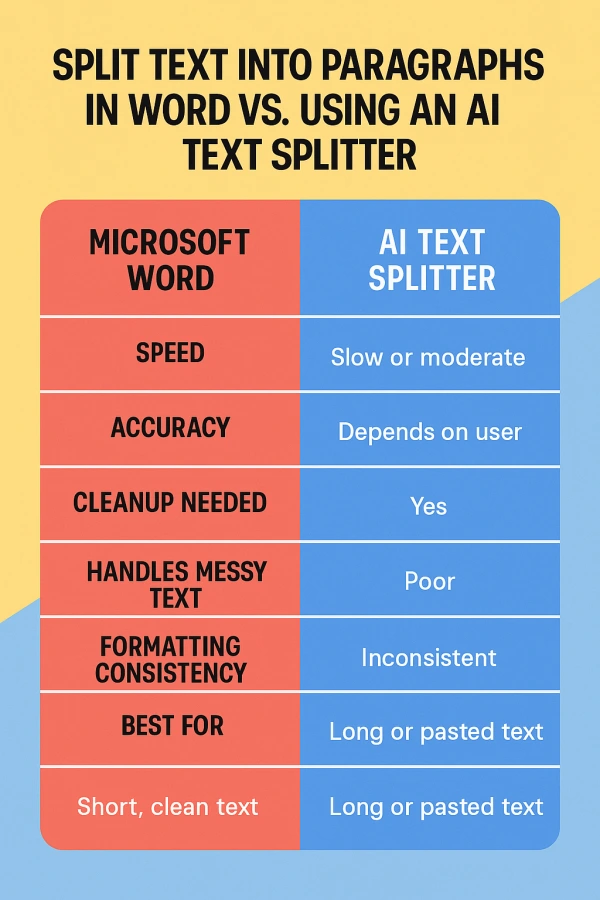
| Feature | Microsoft Word | AI Text Splitter |
|---|---|---|
| Speed | Slow or moderate | Instant |
| Accuracy | Depends on user | High |
| Cleanup needed | Yes | Minimal |
| Handles messy text | Poor | Excellent |
| Formatting consistency | Inconsistent | Very consistent |
| Best for | Short, clean text | Long or pasted text |
Use Word if:
Use an AI Text Splitter if:
In most modern workflows—especially for students, bloggers, and writers—AI is simply faster and cleaner.
If you want to create clean paragraph breaks instantly,
try the AIFreeBox AI Text Splitter.
It:
Breaks long text into readable sections
Groups ideas naturally
Fixes spacing
Works free and without sign-up
Perfect for essays, blog drafts, study notes, and any long-form text.
Splitting text into paragraphs seems simple—until the document grows long or messy.
Word still works for short, simple formatting tasks, but AI tools handle the heavy lifting for longer content.
A practical workflow many people use:
This gives you the best of both worlds: speed + precise control.
Browse all AI tools by category
All AI Tools
Amazon
AI Writing Generator
Article & Content Writing
Branding & Identity
Content Generation
Creative Ideas
Educational Resources
E-commerce
Etsy
Events & Celebrations
Gaming & Fun
Lifestyle & Personal
Marketing & SEO
Poem & Lyrics Writing
Professional Documents
Social Media
Story & Book Writing
Text Effects
TikTok
Writing Enhancement
YouTube
Highly rated and most popular AI tools curated by our experts
Recently added AI tools that are gaining traction


we prioritize displaying the latest content closely related to the current blog post.