LoadingPlease wait a moment...
Free AI Tools. No Sign-Up Required. Full Access.
AI YouTube Intro Generator
Build stronger YouTube openings instantly with this free, no sign-up tool — perfect for boosting early viewer interest and setting the tone for your video.
Use Together With
Combine the current tool with these other tools to work more efficiently.

AI YouTube Thumbnail Generator
image

AI YouTube Video Script Generator
text
AI YouTube Video Ideas Generator
text
AI YouTube Video Description Generator
text
AI YouTube Name Generator
text
AI YouTube Channel Description Generator
text
AI YouTube Hashtag Generator
text
AI Youtube Title Generator
text
AI Youtube Tags Generator
text

AI YouTube Keyword Generator
text
Similar Tools
Discover other tools with functions and purposes similar to the one you are currently viewing.
- AI YouTube Name Generator
- AI Youtube Title Generator
- AI YouTube Thumbnail Generator

- AI YouTube Channel Description Generator
- AI YouTube Font Generator
- AI YouTube Video Description Generator
- AI YouTube Video Script Generator
- AI Blog Intro Generator

- AI Youtube Tags Generator
- AI YouTube Keyword Generator
- AI YouTube Outline Generator
- AI Youtube Hooks Generator
What Everyone's Using
Discover the tools most favored and highly-rated by users on our website.


Related Categories
Explore more AI tools in these related categories
15tools
YouTube
Your Smart Assistant for Video Creation and Promotion! Activate now and propel your YouTube channel to new heights!
text
204tools
Content Generation
AI tools that automatically create text content for your images, audio, or video from user prompts.
text
55tools
Branding & Identity
AI tools for creating, managing, and optimizing brand visuals, and identity assets.
text
This is the AIFreeBox AI YouTube Intro Generator page — an online tool designed for YouTube creators who want to craft engaging video openings. It serves as a script assistant that helps you quickly create short, styled, and attention-grabbing intros at the early stage of content planning.
On this page, you’ll find everything you need to know: what the tool can do, when and how to use it, practical tips to get better results, its limits and possible pitfalls, troubleshooting advice, and a detailed FAQ. The focus is clear — helping you design YouTube intros that set the right tone and keep viewers watching.
What Can AIFreeBox AI YouTube Intro Generator Do?
The AIFreeBox AI YouTube Intro Generator is powered by transformer-based large language models, fine-tuned to generate short and engaging scripts. It is not an automatic video maker, but a script assistant that supports creators at the earliest stage of content planning.
The tool delivers professional intro drafts that are concise, styled, and designed to capture attention within the first 5–10 seconds. Each output follows a structured format — Hook → Value → Call to Action — ensuring clarity and impact. With eight built-in style options such as Energetic, Friendly, Professional, Storytelling, Humorous, Dramatic, Inspirational, and Mysterious, creators can align intros with their unique channel voice.
Supporting 33 languages and multiple style scenarios, the design principle is clear: provide a fast, reliable, and style-consistent starting point, while leaving space for human creativity. The collaboration model is simple — the AI generates multiple drafts to break the “blank page” barrier, and the creator selects, refines, and personalizes the version that best fits their audience and message.
AIFreeBox YouTube Intro Generator vs. Generic Auto Video Maker
Two different purposes: one crafts concise intro scripts; the other auto-assembles video assets. Here’s the clear, quick comparison.
| 📌 Dimension | AIFreeBox AI YouTube Intro Generator | Generic Auto Video Maker |
|---|---|---|
| 🎯 Core Purpose | Text-based intro script assistant; not full video generation. | Auto-stitches visuals, music, and effects into a video. |
| 🖋️ Output | Structured scripts (Hook → Value → CTA), 5–10s focus. | Pre-set clips/animations; script control is minimal. |
| 🎛️ Control & Editing | Multiple styled drafts; creator selects and refines. | Limited script-level control; results feel generic. |
| 🎙️ Style & Tone | 8 built-in styles (Energetic, Friendly, Professional, etc.). | Visual templates dominate; tone consistency is secondary. |
| 🌍 Language & Reach | 33 languages; fast localization for global audiences. | Language depends on templates; localization is uneven. |
| ⚡ Workflow Stage | Early planning: break writer’s block and set the tone. | Late assembly: quick video output, shallow scripting. |
| 🏷️ Brand Consistency | Stable voice via styles; easy to align with channel identity. | Asset-first; brand voice is harder to control. |
| ⚠️ Limitations | Text only; no visuals/music generation. | Video made fast, but personalization and depth are limited. |
Recommend Scenarios and Problem Solved
Creators face different challenges when preparing YouTube videos. Here are the key scenarios where this tool makes a real difference:
| 📌 Scenario | 💡 Problem Solved | 👥 Best For |
|---|---|---|
| ⏱️ Time Pressure | Eliminates the blank page, delivering instant draft intros. | Busy creators, solo YouTubers |
| 🎬 Viewer Retention | Produces hooks that capture attention in the first 5–10 seconds. | Entertainment, vlogs, lifestyle channels |
| 🖋️ Brand Voice | Maintains style consistency with 8 preset tones. | Professional brands, educators, coaches |
| 🌍 Multilingual Reach | Supports 33 languages for global audiences. | International creators, cross-border marketing teams |
| 💡 Idea Generation | Suggests multiple intro variations to spark creativity. | New creators, content brainstorming sessions |
| 📈 SEO & Engagement | Aligns intros with video topics, boosting relevance and watch time. | Educational and tutorial channels |
| 🤝 Human + AI Workflow | AI drafts, humans refine for authenticity and accuracy. | All creators who value efficiency with control |
How to Create a YouTube Intro with AIFreeBox AI:
Step-by-Step Guide

Getting started is simple. Follow these steps to create your first styled intro script:
Step 1 — Provide Your Video Content or Title
Enter the main topic or title of your YouTube video into the text box. Be specific enough to guide the AI, but keep it concise.
Step 2 — Choose a Style

Select one of the eight preset styles (Energetic, Friendly, Professional, Storytelling, Humorous, Dramatic, Inspirational, Mysterious) to match your channel’s tone and audience expectations.
Step 3 — Choose Language
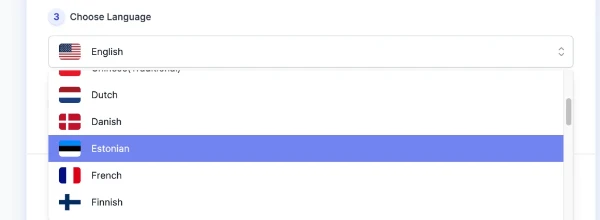
Pick from 33 supported languages to generate intros that connect with your target viewers around the world.
Step 4 — Adjust Creativity Level
Use the slider to set creativity. A middle value (around 5) balances clarity and originality, while higher values (closer to 10) add more experimental phrasing.
Step 5 — Generate Your Intro
Click “Generate” and wait a few seconds. Multiple draft intros will appear, each short (5–10 seconds of speech) and structured as Hook → Value → Call to Action.
Step 6 — Copy or Download
Once you see the generated intros, you can copy them directly for editing or download them for later use in your content workflow.
Step 7 — Report a Bug and Feedback ( Real Human Support )

If something doesn’t work as expected, use the “Report Bug” button. A real support team is available to review your feedback and fix issues quickly — we value user experience and take reports seriously.
Reminder: The AI provides initial drafts — styled, concise, and varied — to help you overcome creative blocks. Your role is to pick the best version, add personal touches like catchphrases or brand notes, and refine details for accuracy and authenticity. This human + AI collaboration ensures intros are both professional and uniquely yours.
Pro Tips for Crafting YouTube Intros That Work
As any experienced YouTuber will tell you, the first seconds matter most. Here’s how to use the AI YouTube Intro Generator effectively — from getting better drafts to polishing them into intros your audience will love.
Part 1 — Getting the Output You Want
- 📝 Be clear with your topic — Instead of just “Travel,” try “Top 5 hidden beaches in Thailand.”
- 🎯 Match the style — Choose the style (Energetic, Friendly, Professional, etc.) that reflects your channel’s identity.
- 🌍 Set the right language — Always select your target audience’s language for natural connection.
- ⚖️ Adjust creativity wisely — A mid-level setting gives balanced, clear intros; higher values make them more playful and experimental.
- 🔄 Compare variations — Generate multiple drafts and pick the one closest to your needs.
Part 2 — Personalizing and Refining
- 🙋 Add your personal touch — Include catchphrases, recurring themes, or channel-specific tone to make the intro unique.
- 🏷️ Keep your brand consistent — Align intros with your logo, visuals, and long-term content style.
- 🗣️ Localize where needed — Adjust expressions and cultural references to fit your audience’s region.
- 📚 Fact-check and adapt — Review content carefully for accuracy, especially in sensitive or professional niches.
- 🤝 Think collaboration, not replacement — Let AI break the creative block, then refine the draft into your authentic voice.
Reminder: The AI helps you move fast by producing styled drafts, but your final edits are what make the intro resonate with real viewers.
User Case Study: From AI Draft to Final Intro
Real-world examples help show how this tool fits into a creator’s workflow. Below are two cases that illustrate how different types of YouTubers use the AI YouTube Intro Generator and refine the drafts into polished intros.
Case 1 — Education Channel
📥 User Input:
The creator enters the topic “AI Trends in 2025”, selects Professional style, and sets the language to English.
🤖 AI Draft:
“In the next few minutes, we’ll explore the most important AI trends shaping 2025. From real-world applications to ethical debates, this intro sets the stage for an informed and engaging discussion.”
✍️ Human Edit:
The creator adds a personal greeting: “Welcome back to Future Insight.” They also adjust pacing for clarity and include a brand note: “Subscribe for weekly updates on tech and innovation.”
🎬 Final Intro:
“Welcome back to Future Insight. In today’s video, we’ll dive into the top AI trends of 2025 — from everyday tools to global challenges. Stay tuned, and don’t forget to subscribe for more weekly updates on tech and innovation.”
Takeaway: The AI generated a structured, professional draft. The creator then added their own style, brand consistency, and factual adjustments, resulting in an intro that is polished, credible, and unique to their channel.
Case 2 — Lifestyle Vlog
📥 User Input:
The creator enters the topic “Weekend in Paris Vlog”, selects Friendly style, and sets the language to English.
🤖 AI Draft:
“Join me for a weekend in Paris, where we’ll explore cozy cafés, iconic landmarks, and hidden streets you don’t see in travel guides. A short journey full of charm and surprises awaits.”
✍️ Human Edit:
The vlogger adds their personal catchphrase: “Hey friends, it’s Anna here.” They also insert a local touch: “We’ll end the day with the best croissant spot in town.”
🎬 Final Intro:
“Hey friends, it’s Anna here! Join me for a weekend in Paris — from cozy cafés to hidden corners you won’t find in the guidebooks. Stick around, because I’ll also share my favorite croissant spot at the end!”
Takeaway: The AI provided a warm and inviting draft. With a few personal tweaks and local flavor, the intro became more authentic, engaging, and perfectly matched the creator’s vlog style.
Style System Overview
Each style gives your intro a different tone. Choose the one that fits your channel best:
- Energetic — Fast-paced and exciting, perfect for hype intros.
- Friendly — Warm and casual, like talking to a friend.
- Professional — Clear and confident, ideal for tutorials or business.
- Storytelling — Narrative-driven, draws viewers into a journey.
- Humorous — Light, playful, and fun for entertainment channels.
- Dramatic — Bold and intense, great for suspenseful content.
- Inspirational — Uplifting and motivational, fits coaching or self-growth.
- Mysterious — Intriguing and suspenseful, leaves viewers curious.
Limitations and Troubleshooting
No tool is perfect. Here are the key limitations of the AI YouTube Intro Generator and how you can address them in practice:
| ⚠️ Limitation | 🔍 Possible Issue | 💡 Suggested Solution |
|---|---|---|
| Text-only output | No visuals, music, or animation generated | Use the draft script as a base, then pair with editing tools |
| Generalized drafts | Some intros may feel generic | Add channel-specific phrases, catchwords, or context |
| Style mismatch | Output tone not fully matching the channel’s identity | Experiment with different styles or fine-tune wording manually |
| Language nuances | Subtle errors in slang, idioms, or cultural context | Review and adjust wording for your target audience |
| Length variation | Intro may be slightly too long or too short | Edit sentences to fit the 5–10 second window |
| Factual accuracy | AI may include broad claims without sources | Always fact-check before publishing in sensitive topics |
| Technical issues | Occasional errors or glitches in generation | Use the “Report Bug” button for quick support from the team |
FAQs
Can this tool generate full video intros with music or animation?
No. The tool only generates text-based intro scripts. You can pair the scripts with your own visuals, music, or editing software.
How long are the generated intros?
Most drafts are designed to fit within 5–10 seconds of speech, about 25–50 words. You can shorten or expand them as needed.
Can I choose the style of the intro?
Yes. The tool offers eight preset styles such as Energetic, Friendly, and Professional. You can also edit the drafts to match your channel’s unique voice.
Does the tool support multiple languages?
Yes. It supports 33 different languages. However, we recommend reviewing and refining language nuances to ensure cultural and audience alignment.
Can I use the generated intros commercially?
Yes, the text drafts can be used in your YouTube content. But if you add third-party visuals, music, or assets, make sure you have the proper usage rights.
Will my input be stored or made public?
No. Your inputs are processed only to generate results. They are not saved, not shared, and will not be made publicly visible. Your privacy is protected.
What if the generated intro doesn’t fit my channel?
You can generate multiple drafts and refine them manually. The AI is a starting point — final adjustments should come from your own creativity and brand voice.
What if I run into errors or technical issues?
Use the “Report Bug” button. A real support team monitors reports and works to resolve issues quickly to ensure a smooth experience.
Creator’s Note
The AI YouTube Intro Generator was built with a simple idea in mind: help creators move faster at the very beginning of their video process. The tool gives you structured drafts — short, styled, and clear — but the final voice and meaning always belong to you.
Think of AI here not as a replacement, but as a supportive partner. It helps break through the blank page, suggests different directions, and offers options you might not have considered. Your role is to shape these drafts, add your personal tone, and make sure the content reflects your values and your audience’s expectations.
Every strong intro comes from this balance: AI to provide a quick start, and you to bring authenticity and depth. That balance is where creativity thrives.
2025-10-20
▶️ Start your video with impact — create a powerful YouTube intro now.
Free, online, and ready anytime. Craft intros that set the tone, capture attention fast, and keep viewers watching.